The moment a CLI grows past one job — git commit, git push, git remote add — you
need subcommands. In Click, subcommands come from groups: a group is a command whose
job is to dispatch to child commands. This guide builds a small but realistic widget
CLI with a top-level group, nested groups, shared state, and tests, then covers the
production concerns that bite once the tree gets large.
TL;DR
- Turn a function into a dispatcher with
@click.group(), then attach children with@cli.command()and@cli.group(). - Share state from parent to child through
ctx.obj, usingctx.ensure_object(dict)in the group and@click.pass_context(or@click.pass_obj) in the children. - Test the whole tree in-process with
click.testing.CliRunner— no subprocess needed. - For large CLIs, load subcommands lazily so startup stays fast.
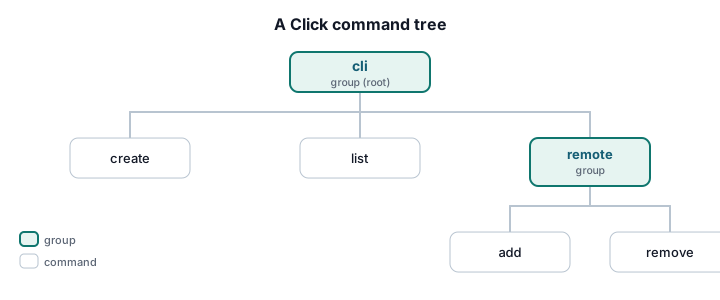
A group is just a command that dispatches
Start with the root. A group function runs before the chosen subcommand, which makes it the natural place to parse global options and set up shared state.
# widget/cli.py
import click

@click.group()
@click.version_option(version="1.0.0", prog_name="widget")
@click.option("-v", "--verbose", is_flag=True, help="Enable verbose output.")
@click.option(
    "--config",
    type=click.Path(exists=True, dir_okay=False, path_type=str),
    help="Path to a config file.",
)
@click.pass_context
def cli(ctx: click.Context, verbose: bool, config: str | None) -> None:
    """widget — manage widgets from the command line."""
    # ensure_object guarantees ctx.obj exists even when a child is invoked directly.
    ctx.ensure_object(dict)
    ctx.obj["verbose"] = verbose
    ctx.obj["config"] = config
@click.version_option adds a --version flag for free. ctx.ensure_object(dict) creates
a shared dictionary that every child command can read.
Attaching commands
Each subcommand is a normal Click command attached to the group with @cli.command(). Use
@click.pass_context when a command needs the shared object:
@cli.command()
@click.argument("name")
@click.pass_context
def create(ctx: click.Context, name: str) -> None:
    """Create a new widget called NAME."""
    if ctx.obj["verbose"]:
        click.echo(f"[verbose] config={ctx.obj['config']}")
    click.echo(f"Created widget {name!r}")

@cli.command(name="list")
def list_widgets() -> None:
    """List all widgets."""
    for name in ("widget-a", "widget-b"):
        click.echo(name)
Two details worth calling out:
- The function is named
list_widgetsbut the command islist. Naming the functionlistwould shadow the builtin, so passname="list"and keep a safe Python name. - Click derives the command name from the function name by replacing underscores with
hyphens, so
def remove_all()becomes theremove-allcommand automatically.
Nesting groups
A group can contain other groups, giving you widget remote add .... Attach a child group
with @cli.group():
@cli.group()
def remote() -> None:
    """Manage remote widget registries."""

@remote.command()
@click.argument("url")
def add(url: str) -> None:
    """Register a remote registry at URL."""
    click.echo(f"Added remote {url}")

@remote.command(name="remove")
@click.argument("url")
def remove_remote(url: str) -> None:
    """Remove the remote registry at URL."""
    click.echo(f"Removed remote {url}")
Now widget remote --help lists add and remove, and widget remote add https://...
runs the nested command. Nesting can go arbitrarily deep, but two levels is usually the
practical ceiling for usability.
Sharing state cleanly
Reaching into ctx.obj["verbose"] everywhere is fragile — a typo'd key fails at runtime.
For anything beyond a flag or two, store a typed object instead of a bare dict:
from dataclasses import dataclass

@dataclass
class AppState:
    verbose: bool
    config: str | None

# In the group body, store a typed object instead of a dict:
#   ctx.obj = AppState(verbose=verbose, config=config)
#
# In a command, pass_obj injects ctx.obj directly:
@cli.command()
@click.pass_obj
def status(state: AppState) -> None:
    """Show resolved configuration."""
    click.echo(f"verbose={state.verbose} config={state.config}")
@click.pass_obj hands the command ctx.obj directly, so you get a typed AppState and
editor autocompletion instead of stringly-typed dictionary access.
Middleware-style behavior
Because the group body runs before every subcommand, it doubles as middleware: configure logging, open a shared connection, or enforce preconditions in one place.
import logging

@click.group()
@click.option("-v", "--verbose", is_flag=True)
@click.pass_context
def cli(ctx: click.Context, verbose: bool) -> None:
    logging.basicConfig(level=logging.DEBUG if verbose else logging.WARNING)
    ctx.ensure_object(dict)
    # Register cleanup that runs after the subcommand completes, even on error.
    ctx.call_on_close(logging.shutdown)
ctx.call_on_close() registers teardown that fires when the context exits — the right hook
for closing files, flushing buffers, or releasing connections opened in the group.
Wiring the entry point
Expose the root group as a console script in pyproject.toml so users get a widget
command on PATH:
[project.scripts]
widget = "widget.cli:cli"
After pip install -e . (or uv pip install -e .), widget create gadget runs your root
group. See best practices for Python CLI entry points
for the full PEP 621 treatment.
Testing the command tree
Click's CliRunner invokes commands in-process and captures output and exit code, so tests
are fast and need no subprocess. Test the root, the nested group, and the failure paths:
# tests/test_cli.py
from click.testing import CliRunner
from widget.cli import cli

def test_create_succeeds() -> None:
    runner = CliRunner()
    result = runner.invoke(cli, ["create", "gadget"])
    assert result.exit_code == 0
    assert "Created widget 'gadget'" in result.output

def test_global_flag_reaches_subcommand() -> None:
    runner = CliRunner()
    result = runner.invoke(cli, ["--verbose", "create", "gadget"])
    assert "[verbose]" in result.output

def test_nested_group() -> None:
    runner = CliRunner()
    result = runner.invoke(cli, ["remote", "add", "https://example.com"])
    assert result.exit_code == 0
    assert "Added remote https://example.com" in result.output

def test_unknown_command_exits_nonzero() -> None:
    runner = CliRunner()
    result = runner.invoke(cli, ["frobnicate"])
    assert result.exit_code != 0
Note that --verbose is a global flag on the group, so it goes before the subcommand:
widget --verbose create gadget, not widget create --verbose gadget. Getting flag
placement right is one of the most common surprises with grouped CLIs — surface it in your
help text and tests.
Keeping startup fast with lazy loading
Every import at module load runs when the CLI starts, even for commands the user didn't
call. For a tool with dozens of subcommands and heavy dependencies, that's a visible delay.
Click's recommended fix is a group that imports children on demand:
import importlib
import click

class LazyGroup(click.Group):
    """A group that imports subcommands only when they're actually invoked."""

    def __init__(self, *args, lazy_subcommands: dict[str, str] | None = None, **kwargs):
        super().__init__(*args, **kwargs)
        # Map command name -> "module.path:attribute"
        self.lazy_subcommands = lazy_subcommands or {}

    def list_commands(self, ctx: click.Context) -> list[str]:
        return sorted([*super().list_commands(ctx), *self.lazy_subcommands])

    def get_command(self, ctx: click.Context, cmd_name: str):
        if cmd_name in self.lazy_subcommands:
            module_path, attr = self.lazy_subcommands[cmd_name].split(":", 1)
            module = importlib.import_module(module_path)
            return getattr(module, attr)
        return super().get_command(ctx, cmd_name)

@click.group(
    cls=LazyGroup,
    lazy_subcommands={"report": "widget.commands.report:report"},
)
def cli() -> None:
    """widget with lazily loaded subcommands."""
The heavy widget.commands.report module is imported only when the user runs
widget report, so widget --help and unrelated commands stay instant.
Production notes
- Exit codes: raise
click.ClickException(or subclasses) for expected errors — Click prints the message to stderr and exits non-zero. Reserve bareraisefor bugs. - Don't call
sys.exit()inside commands; raiseclick.exceptions.Exit(code)soCliRunnercan capture the code in tests. - Help text is your UI: every group and command should have a one-line docstring; it becomes the help summary. Document where global flags go.
- Cross-platform: use
click.Path(path_type=pathlib.Path)andclick.echo()(which handles encoding and strips colors when output is piped) instead ofprint().